You can easily configure the Windows Fax Service to send/receive faxes via Fax Voip modems in one click using the Configure Fax Service button in the Fax Voip T.38 Modem Control Panel. This command also restores Windows Fax Service components on your computer (if necessary), and also re-registers the Fax Voip T.38 Modem Routing Extension (responsible for Incoming Fax Routing Methods - Microsoft Fax) with Windows Fax Service. Note that the Fax Voip T.38 Modem installation program automatically performs the specified actions. To configure fax service and to register Fax Voip T.38 Modem Routing Extension without re-installation of the software do the following:
1. Open Fax Voip T.38 Modem Control Panel. To do this click Start, point to Fax Voip T.38 Modem; click Fax Voip T.38 Modem Control Panel. Alternatively, you can select Fax Voip T.38 Modem Control Panel command from the Fax Voip T.38 Modem tray icon menu.
2.  In the Fax Voip T.38 Modem Control Panel, click Configure Fax Service in the Main tab of the Ribbon. Administrator privileges are required.

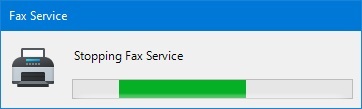
3. Wait until the program completes the necessary actions. The Windows Fax Service can be restarted several times.
4. In the Windows Fax Service Settings window you can specify necessary settings for configuring fax service with Fax Voip modems.
On Windows 11 computer, you should choose the Fax Voip 14.4K TAPI Voice-Fax Modem device that you want to use to send and receive faxes through the Windows Fax Service.
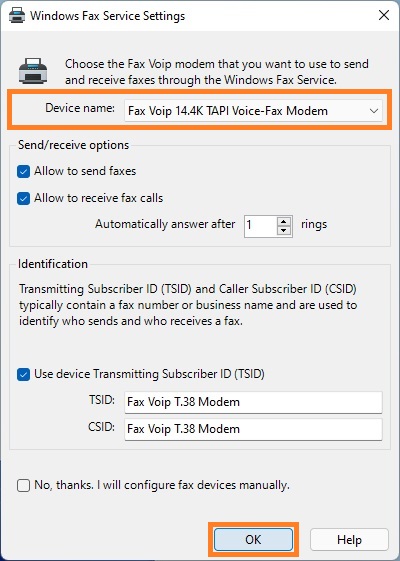
On Windows Server 2025 computer, the specified settings will be applied to all Fax Voip 14.4K TAPI Voice-Fax Modem devices currently installed in your system.

The following settings can be configured:
Send/receive options
Allow to send faxes
Specify whether to use Fax Voip modem(s) for sending faxes.
Allow to receive fax calls
Specify whether to use Fax Voip modem(s) for receiving faxes.
Automatically answer after ... rings
Select the number of rings after which the Fax Voip modem(s) can answer incoming phone call to try to receive a fax.
Identification
Use device Transmitting Subscriber ID (TSID)
Specifies whether the device's Transmitting Subscriber ID (TSID) defined in the properties of the fax device is transmitted to the recipient when an outgoing fax is sent. If this option is not enabled, the TSID used in the outgoing fax is the sender's fax number, as specified in the Sender Information. See also in the Configure Fax Station ID and Fax Headline chapter of this user manual.
TSID
Specify the Transmitting Subscriber Identification (TSID). The TSID is a text string that identifies you as a fax sender. It is transmitted to the recipient when an outgoing fax is sent, and it may appear in the display of the recipient's fax machine. The TSID is limited to 20 characters.
CSID
Specify the Called Subscriber Identification (CSID). The CSID is a text string that identifies you as a fax recipient. It is transmitted to a fax sender when you receive a fax, and it might appear in the display of the sender's fax machine. The CSID is limited to 20 characters.
No, thanks. I will configure fax devices manually.
Flag this checkbox if you do not want the Fax Voip T.38 Modem to automatically configure the fax service, or do not want to change the current configuration.
5. In the Windows Fax Service Settings window, click OK.
6. Wait until the program completes all necessary actions. The Windows Fax Service can be restarted several times.

7. To view the log, click Yes in the Message Box.
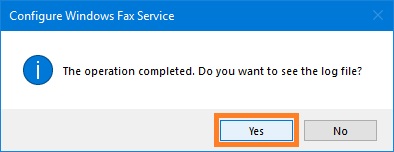
Below you can see the full list of actions produced by the Configure Fax Service command (actions marked as optional are not executed when the customer selects the No, thanks. I will configure fax devices manually checkbox, see pictures above):
- Stopping Windows Fax Service.
- Installing the Windows Fax Service, if not installed (all supported operation systems).
- On Windows Server 2025: Fixing critical issue with missing 32-bit fax service components that are required to access the fax service via API. Copying missing libraries (WinFax.dll, FXSCOMEX.dll and others) to WINDOWS\SysWOW64 folder. Registering FaxComEx.FaxServer and FaxComEx.FaxDocument classes in the 32-bit registry node (WOW6432Node).
- On Windows 11 and Windows Server 2025: Installing classic Notepad application (Notepad (system) optional feature) if not installed. Removing modern Windows Notepad application (Microsoft.WindowsNotepad AppX Package) if installed. This is required to fix background printing of text files.
- On Windows 11: Fixing issue in Windows Fax and Scan software where the modern print dialog box would appear and an error would occur when trying to send a fax using the 'New Fax' command.
- Installing Desktop Experience Feature, if not installed (Windows Server 2012/2012R2 and Windows Server 2008R2).
- Registration of Fax Voip T.38 Modem Routing Extension (responsible for Incoming Fax Routing Methods - Microsoft Fax) with Windows Fax Service.
- Configuring Windows Fax Service permissions definition.
- Configuring Windows Fax Service to automatically start on Windows startup.
- Creating Fax Account with the name 'Fax Voip T.38 Modem' if it does not exist.
- Configuring fax service to archive all successfully sent faxes to Sent Items folder. This is required for correct operation of the Outgoing Fax Routing Methods - Microsoft Fax.
- On Windows 11, Windows 10 version 1709 or later, Windows Server 2025, Windows Server 2022 and on Windows Server 2019: Fixing bug in Microsoft Modem Device Provider that does not store CallerID and TSID in the fax service database after receiving a fax on these Windows versions.
- On Windows 11, Windows 10, Windows Server 2025, Windows Server 2022, Windows Server 2019 and Windows Server 2016: Fixing bug in Windows Fax and Scan software when 'Forward as E-mail' button is grayed out, while the MAPI e-mail client is installed in the system.
- Creating Windows Fax and Scan shortcut on the desktop. On Windows 8 or later, creating Windows Fax and Scan shortcut in the Start menu. On Windows Server OS, creating Fax Service Manager shortcut on the desktop and in the Start menu.
- (optional) Configuring Transmitting Subscriber ID (TSID) and Called Subscriber ID (CSID) for all Fax Voip 14.4K TAPI Voice-Fax Modem Fax Devices (default is 'Fax Voip T.38 Modem'). Configuring Use device Transmitting Subscriber ID (TSID) option, see also in the Configure Fax Station ID and Fax Headline chapter of this user manual.
- (optional) On Windows 11, Windows 10, Windows 8/8.1 and Windows 7: configuring the selected Fax Voip 14.4K TAPI Voice-Fax Modem Fax Device to send and/or receive faxes. By default, both sending and receiving faxes are allowed.
- (optional) On Windows Server 2025, Windows Server 2022, Windows Server 2019, Windows Server 2016, Windows Server 2012/2012R2 and Windows Server 2008R2: configuring all Fax Voip 14.4K TAPI Voice-Fax Modem Fax Devices to send and/or receive faxes. By default, both sending and receiving faxes are allowed.
- (optional) On Windows 11, Windows 10, Windows 8/8.1 and Windows 7: enabling Fax Monitor and fax notifications for the selected Fax Voip 14.4K TAPI Voice-Fax Modem Fax Device.
- (optional) On Windows Server 2025, Windows Server 2022, Windows Server 2019, Windows Server 2016, Windows Server 2012/2012R2 and Windows Server 2008R2: enabling Fax Monitor and fax notifications for the first Fax Voip 14.4K TAPI Voice-Fax Modem Fax Device.
- Enables / disables Fax Voip T.38 Modem Routing Extension fax routing methods for all Fax Voip 14.4K TAPI Voice-Fax Modem Fax Devices, depending on the current settings.
- Starting Windows Fax Service.


