Upgrade to Fax Voip FSP version 5 and save 50%
Upgrade to Fax Voip FSP version 5 today! If you are currently using an older version of Fax Voip FSP (version 4 or earlier) you can upgrade your current license to Fax Voip FSP version 5 at a special discount and save 50%. Save money and enjoy great new features with the latest version of Fax Voip FSP software.
What's new in version 5
Version 5 adds some exciting new features to the Fax Voip FSP software. Some of the great improvements in version 5 include:
5.1.1
- Windows Server 2025 support added.
- Improved support for Windows 11.
- In Windows Server 2025: Fixed critical issue with missing 32-bit fax service components that are required to access the fax service via API. Copying missing libraries (WinFax.dll, FXSCOMEX.dll and others) to WINDOWS\SysWOW64 folder. Registering FaxComEx.FaxServer and FaxComEx.FaxDocument classes in the 32-bit registry node (WOW6432Node).
- In Windows 11 and Windows 10 (latest versions): The automatic installing of the Windows Fax and Scan feature during Fax Voip FSP installation has been fixed.
- In Windows 11: Fixed issue in Windows Fax and Scan software where the modern print dialog box would appear and an error would occur when trying to send a fax using the 'New Fax' command.
- In Windows 11: Installing classic Notepad application (Notepad (system) optional feature) if not installed. Removing modern Windows Notepad application (Microsoft.WindowsNotepad AppX Package) if installed. This is required to fix background printing of text files.
- In Windows 11 and Windows Server 2025: Fixed issue whith random errors related to tray notifications that could cause Fax Voip FSP Manager to crash. Fixed position of the pop-up window that appears near the taskbar when hovering the mouse over the Fax Voip FSP tray icon.
- Updated help system.
- Some other improvements.
NOTE: The upgrade version of Fax Voip FSP version 5 can only be installed on the computer for which you have valid license for Fax Voip FSP version 4 or earlier. Trial versions of Fax Voip FSP software do not qualify as an eligible product. You will be unable to install the Fax Voip FSP 5 upgrade if you do not have a valid license for Fax Voip FSP version 4 or earlier, registered for the computer where Fax Voip FSP version 5 installed.
Any questions regarding upgrade eligibility or upgrade requirements please This email address is being protected from spambots. You need JavaScript enabled to view it..
How to upgrade to version 5 and save 50%
To upgrade your current license, do the following:
1. Download and install the latest Fax Voip FSP version.
2. Open Fax Voip FSP Control Panel. To do this click Start, point to Fax Voip FSP; click Fax Voip FSP Control Panel.
3. Click License in TreeView.
4. The Licenses pane shows all the licenses that are valid for previous versions of Fax Voip FSP. The <Upgrade> button should be visible and available. If for some reason you don't see your old licenses, please contact our This email address is being protected from spambots. You need JavaScript enabled to view it..
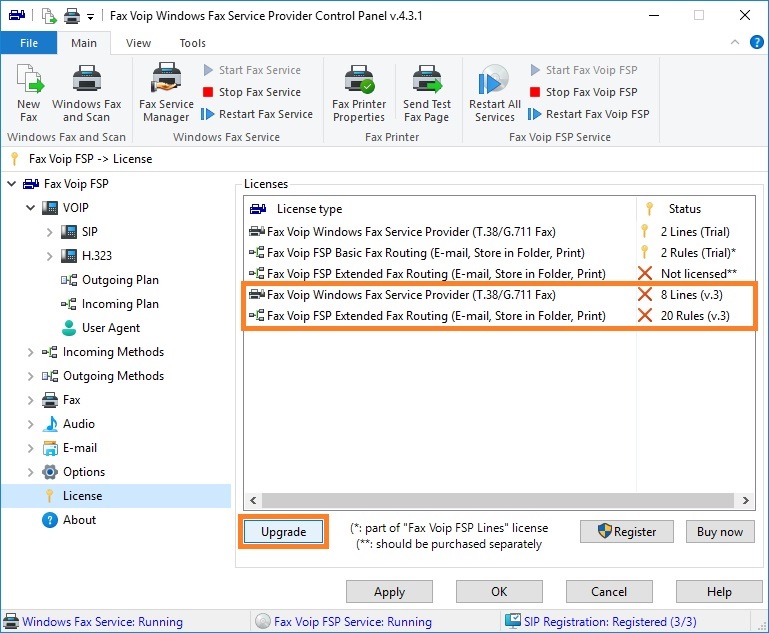
5. Click <Upgrade>. You will be redirected to the payment page, where you can pay for the upgrade of your current license.
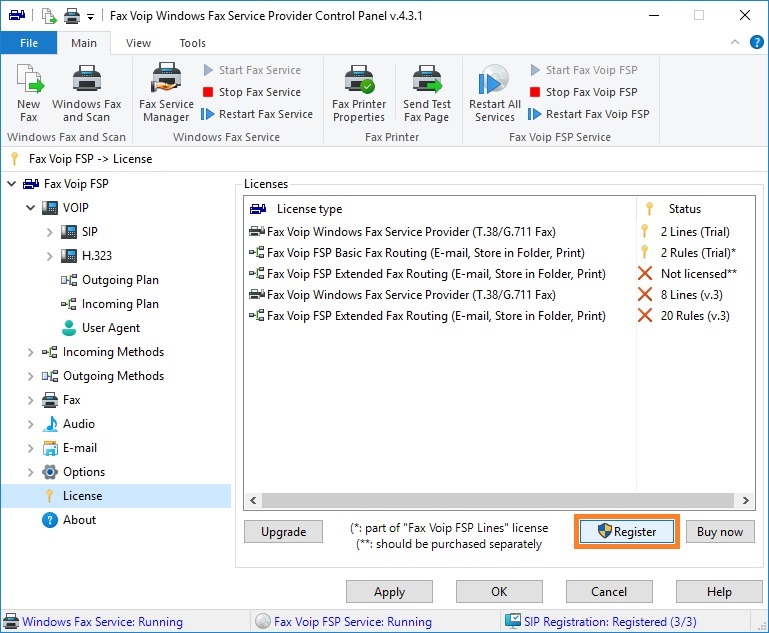
6. After doing payment, in the Fax Voip FSP Control Panel click License in TreeView, then click <Register>.
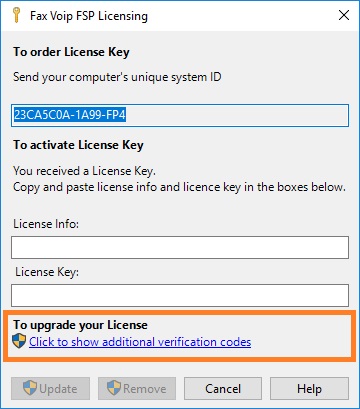
7. In the Fax Voip FSP Licensing window, in the To upgrade your License section click Click to show additional verification codes link.
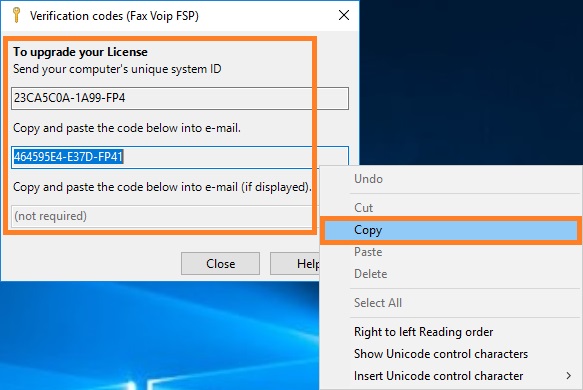
8. Copy and paste the following information into your document (e-mail):
- SystemID (-FP5 at the end)
- Verification code #1 (-FP51 at the end)
- Verification code #2 (-FP52 at the end, if only displayed)
The SystemID is required to generate your license key. Verification codes are required to verify that the Fax Voip FSP really running on the computer for which you have valid license for previous versions of Fax Voip FSP.
9. The email with SystemID and Verification codes should be sent to This email address is being protected from spambots. You need JavaScript enabled to view it. or This email address is being protected from spambots. You need JavaScript enabled to view it..
10. After receiving the new license key follow the instructions that you can find in the e-mail with license key.
Notes
- The upgrade version of Fax Voip FSP 5 will check your hard drive to verify that you are a licensed user of a qualifying Fax Voip FSP software product. Trial versions of Fax Voip FSP software do not qualify as an eligible product. You will be unable to install the Fax Voip FSP 5 upgrade if you do not have valid Fax Voip FSP license already installed.
- You can only upgrade an existing license (the same number of Fax Voip Line devices and Fax Routing rules). If you need additional Fax Voip Line devices or Fax Routing rules you can buy them separately.
- License upgrade does not involve transfer of license to another computer and should be done on the computer where Fax Voip FSP has been licensed previously.
- The discount provided in case of upgrade depends on the current policy of Fax Voip Software and can be changed after some time.
- Any questions regarding upgrade eligibility or upgrade requirements please send email to the This email address is being protected from spambots. You need JavaScript enabled to view it..